Jev Explained: When to Use TypeSafe AI's Decision Model

Jev is TypeSafe AI's first System One model: an AI model that evaluates input and returns constrained decisions and probabilities instead of writing a conversational answer. You supply the situation and the questions; your application uses the results. TypeSafe calls this category System One to emphasize fast, focused judgments. It is the company's product terminology, not an assurance of human-like understanding. TypeSafe's introduction
Think of the difference between “write a reply to this API support ticket” and “which queue should receive it?” Jev is designed for the second job. That distinction makes it interesting for developers who need a classification inside an existing application, rather than another chat interface.
The useful question is not whether Jev can replace every LLM. It is whether one small decision in your workflow deserves a dedicated model—and whether you can measure when that decision goes wrong.
What does a System One model actually do?
The documented interface takes a state and typed questions. State can represent the text or application information being evaluated. Multiple questions can inspect the same state independently. Introduction to Jev
Jev does not generate replies, code, or explanations of its reasoning. A generative model can still handle those tasks elsewhere in the application. TypeSafe describes System One as trained for calibrated decisions, but its documentation explicitly distinguishes calibration across predictions from correctness on an individual answer. System One documentation
In practice, evaluate it as a component, not as an autonomous operator. A well-formed answer can be convenient to consume and still send a ticket to the wrong team.
Choice, Score, and Noul: three different answer shapes
The primitive determines what your question means—not just how the result is formatted.
| Primitive | Use it to ask | What comes back | Example in an API support workflow |
|---|---|---|---|
| Choice | Which of these options fits? | A selected option, the options' probabilities, and confidence |
Choose credentials, rate_limits, billing, or other. |
| Score | Where does this fall on an ordered rubric? | A probability-weighted score, level probabilities, a legend, and confidence |
Rate disruption using defined levels: inconvenient, partly blocked, fully blocked. |
| Noul | Is this proposition true? | A noul value between 0 and 1 representing the probability of yes |
Does the message explicitly request a person? |
These are illustrative questions, not test results. The return shapes are documented in Choice, Score, and Noul.
For Choice, include an escape option when your categories do not cover every input. Otherwise, selecting an allowed label can look successful even when none is appropriate.
For Score, define the levels before interpreting the number. A result between levels is possible because the score is a weighted mean. It is not an exact measurement of downtime or financial loss. Two different probability distributions can also have the same mean. How Score works
Noul needs a different reading: 0.8 means the model assigns a high probability to “yes,” not that an issue is “80% severe.” It has no separate confidence field. Reading a Noul
A small example: triage without handing over control
Imagine a support message: “Every request returns 401 after I rotated my key. Can someone help me?” This is a hypothetical design example; no Jev call was run for this article.
A bounded implementation would:
- Send the relevant message and non-sensitive context as state. Do not include the API key.
- Ask a Choice question about the support queue and, if useful, a separate Noul about an explicit request for a person.
- Let application code decide whether to route automatically or ask for review, using thresholds validated on past tickets.
- Keep key rotation, account access, and any other action behind ordinary permission checks.
TypeSafe's design guidance similarly keeps control flow and side effects in code while assigning narrow judgments to the model. The concrete ticket, categories, and operating policy here are illustrative. Building with TypeSafe
Notice what is missing: a prompt asking Jev to diagnose the entire incident and fix the account. A classification is useful without becoming authorization.
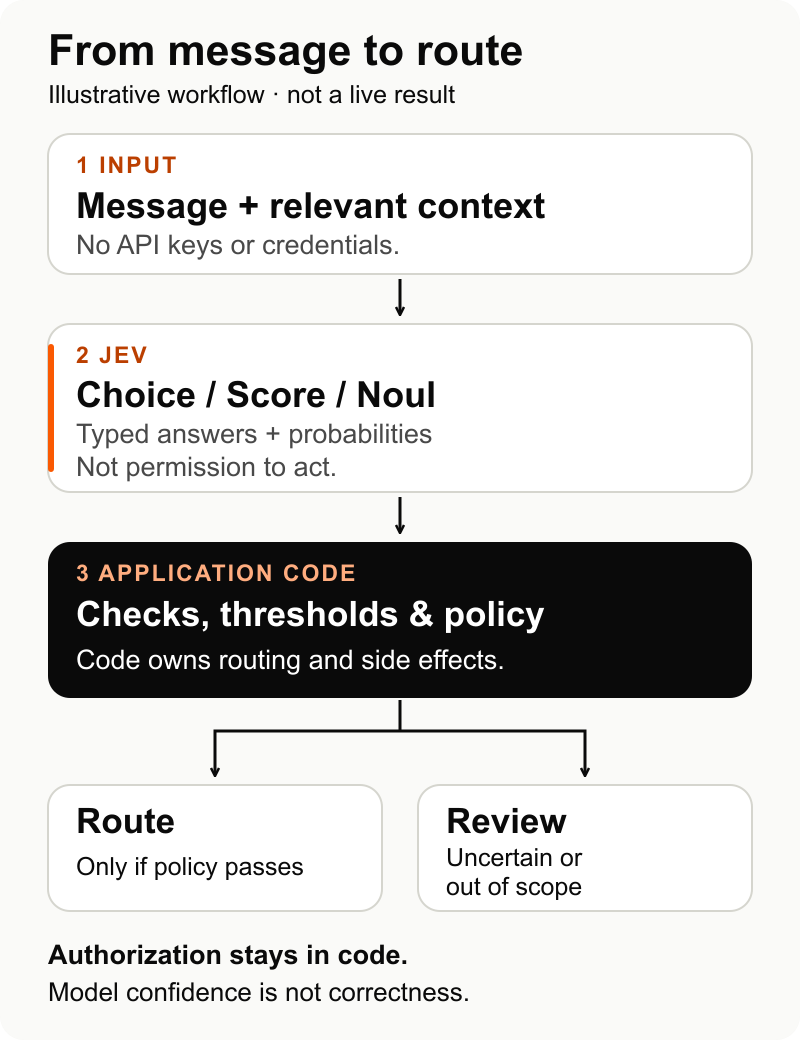
Illustrative design, not a live API result. Jev supplies typed judgments; application code retains policy checks, routing, and authorization.
How to try the Jev API
The official quickstart points to TypeSafe's playground and dashboard API-key flow. The September 15 launch announced early access, so check current admission rather than assuming every reader can immediately obtain access. Launch announcement
The documented endpoint is POST https://api.typesafe.ai/v1/systemone, authenticated with a Bearer API key. Here is an illustrative request body for the ticket above, following the HTTP API reference:
{
  "model": "jev-1.13.0",
  "state": "Every request returns 401 after I rotated my key. Can someone help me?",
  "questions": {
    "support_queue": {
      "type": "choice",
      "instructions": "Which queue best matches the issue described? Classify the message; do not diagnose or take action.",
      "criteria": {
        "credentials": "Authentication failures or API-key configuration",
        "rate_limits": "Request limits or throttling",
        "billing": "Charges, invoices, or payment questions",
        "other": "Anything outside these queues, or too little information to choose"
      }
    }
  }
}
As checked on September 20, 2026, jev-latest resolves to jev-1.13.0. The example pins that version so an alias update does not silently change the model being evaluated. Record the response's model ID alongside your results. Models and aliases
This is a request example, not a complete production client. Handle authentication failures, invalid requests, throttling, and service overload explicitly; a failed request must not become a default “approved” decision. TypeSafe documents these errors in its API reference.
Confidence is not your measured accuracy
For Choice and Score, confidence summarizes how concentrated the returned probability distribution is. It is not simply the probability of the top option, and it is not a measured accuracy rate for your application. A sharply concentrated wrong answer remains wrong. Confidence documentation
That gives you three separate checks:
- Shape: Did the response conform to the expected interface?
- Model uncertainty: How were probabilities distributed among the possible answers?
- Observed correctness: Did the decision match the label or outcome you trust?
The first two do not establish the third. Before treating high confidence as permission to automate, compare predictions with labeled examples from your own workflow. Leave an escalation path for uncertainty and for situations your categories cannot represent.
Where Jev fits—and where to keep other tools
A sensible first candidate is a repeated semantic judgment with a small answer space: routing a message, assessing a passage against a rubric, or flagging a stated intent. Use ordinary code when the result is an exact calculation; use a generative model when the result must be new text. This division follows TypeSafe's workflow guidance.
The current model accepts text, including text represented as strings, JSON objects, or arrays—not images, audio, or video. Its documented request limits are 64k tokens overall, with a separate 32k limit for state plus the longest question. Neither limit is a promise of equal accuracy throughout the window. Current model specifications
TypeSafe's Jev 1.13 limitations page identifies unreliable counting and date comparisons, difficulty with indirection, and distraction from irrelevant context. More importantly, it warns that adversarial content in state can steer the answer. A constrained output does not make the model immune to prompt injection. Jev 1.13 limitations
For the support example, that means a message telling the model to select a privileged queue is a test case—not a reason to trust the selected label. Keep authorization independent of that label.
Are the speed and cost claims useful?
They are reasons to run a comparison, not the result of your comparison.
As checked on September 20, TypeSafe lists Jev 1.13 at $0.042 per million input tokens, with output tokens free. This is the supplier's listed model price, not a tested bill or the total cost of your workflow. Model pricing
The launch reports 193.6× faster and 444.6× cheaper performance in its selected workflow evaluation. It also discloses important conditions: reference probabilities came from other large models, the team designed the workflows, and the comparison asked LLMs for decisions plus probabilities. Those conditions matter when interpreting the headline. Launch evaluation and caveats
For your own comparison, include request preparation, any preprocessing, failures, escalation, and human review. A low model charge is not a saving if the workflow creates expensive wrong actions or simply moves most cases into another queue.
The first evaluation worth running
Start with one queue decision, not a whole agent replacement. Keep a held-out set of tickets that was not used to tune your questions, including ambiguous, out-of-category, and adversarial messages.
Compare Jev with your current rule or model baseline on that same set. Record the wrong routes that matter most, the proportion sent for review, end-to-end latency, and total cost per correctly handled ticket. Tune thresholds on separate development examples, then check the held-out set without further tuning. If you change model versions or question wording, recheck the result.
The decision can be small: does Jev handle this particular judgment well enough to keep, with an acceptable review burden? If yes, you have evidence for one useful component. If not, typed output and a fast response are not enough to justify the switch. The official quickstart is the next step when you are ready to test that question.
Jev returns typed decisions and probabilities rather than conversational text. Start with one bounded classification task, keep authorization in code, and evaluate mistakes, review burden, latency, and cost against your current baseline. The examples and workflow diagram are illustrative, not live test results.