Qwen3.8-Omni-Flash API: Inputs, Outputs, and Setup
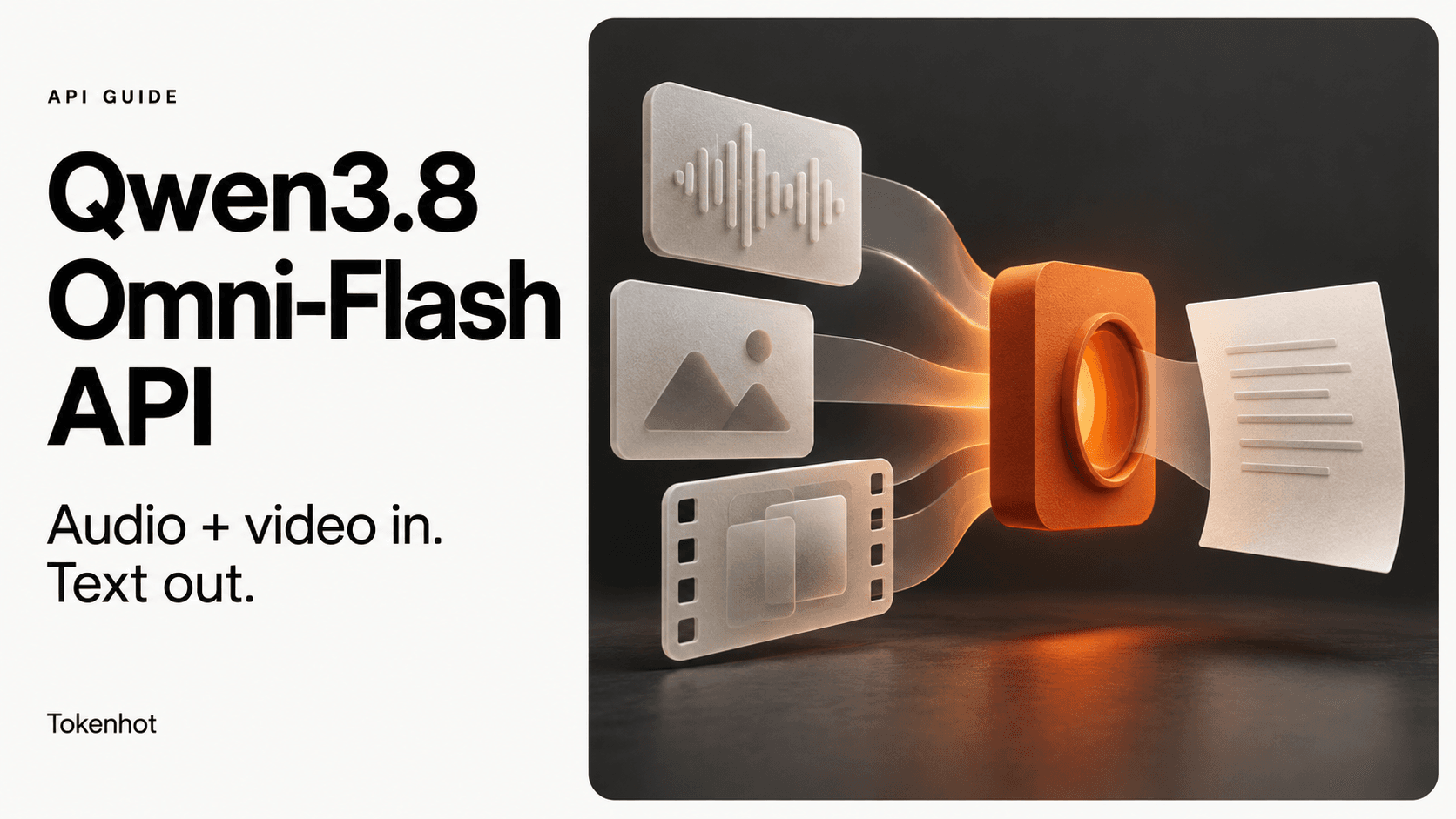
Qwen3.8-Omni-Flash accepts text, images, audio, and video, but returns text. Alibaba Cloud exposes it through both Chat Completions and Responses. That makes it a candidate for turning a recording into a summary or a video into a written explanation—not for generating spoken replies. Model reference
Start with the output your application needs. A meeting-notes service needs a usable summary; a voice assistant also needs speech generation and a suitable conversational transport. Successfully sending an audio file does not solve that second requirement.
This guide builds a direct Alibaba Cloud integration first, then separates the checks needed for a gateway. It follows documentation checked on September 21, 2026; the example has not been tested against the live model.
Is this the right model for your application?
Consider it for a workflow whose finished product is text: decisions extracted from a meeting, a description of a screen recording, or an answer about supplied media. Evaluate it against your actual recordings before depending on those answers.
Do not choose it on the assumption that “Omni” means every output modality. Alibaba's usage guide distinguishes Qwen3.8-Omni-Flash text analysis from Qwen3.5-Omni speech output. Examples for those models are interleaved on the same page, so copying a nearby audio-output configuration can put you on the wrong integration path. Qwen-Omni guide
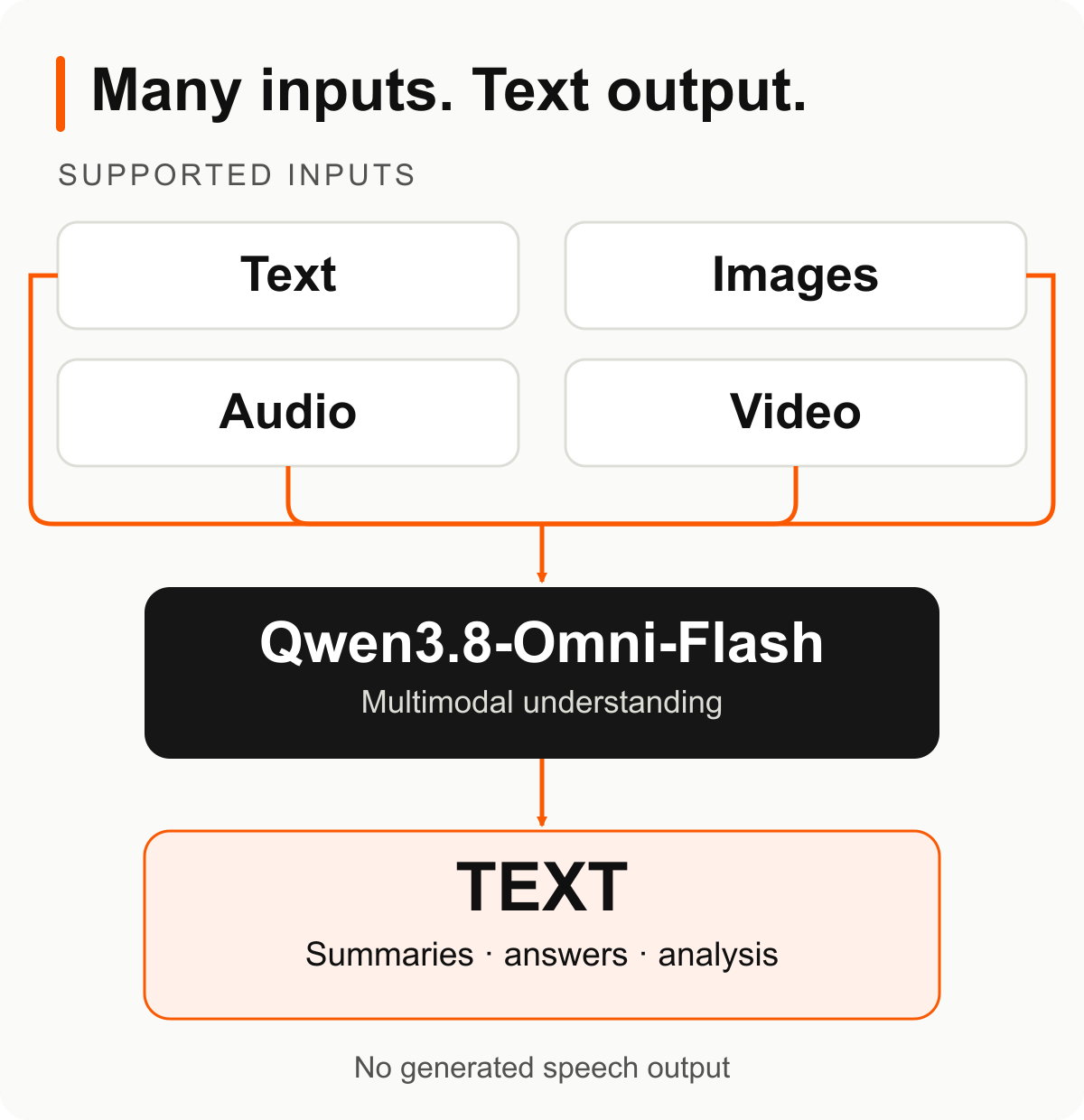
Capability diagram based on the model documentation—not a live API response or a gateway availability claim.
Configure the provider before adding media
For this example, install the Python client with python -m pip install openai, then configure three environment variables in the process that will run your script:
| Variable | What to supply |
|---|---|
DASHSCOPE_API_KEY |
Your Alibaba Cloud Model Studio key for the selected region. |
DASHSCOPE_BASE_URL |
The SDK base_url listed for your workspace and region. |
AUDIO_URL |
An HTTPS URL to a short WAV recording the provider can retrieve. |
Copy the SDK base URL, not the complete /chat/completions request URL. Current regional examples use a workspace-specific host and end in /compatible-mode/v1. Replace the workspace placeholder with your real ID. Chat API endpoints
Use a non-sensitive recording you have permission to process for the first run. A URL that works only inside your browser session is a poor test asset. If you use a signed URL, keep it valid through processing and keep it out of public logs. Do not place API keys in source code or commit them with the example.
Send an audio recording and collect the text answer
The request below follows the documented Qwen3.8 audio-input shape. It asks for a bounded summary, keeps reasoning separate from the final answer, and refuses to report an interrupted response as a completed summary. Official audio-input example
Save this as summarize_audio.py, set the variables above, and run python summarize_audio.py. A real run uses your provider account and may incur charges.
import os
import sys

from openai import OpenAI


with OpenAI(
    api_key=os.environ["DASHSCOPE_API_KEY"],
    base_url=os.environ["DASHSCOPE_BASE_URL"],
    timeout=120.0,
    max_retries=0,
) as client:
    stream = client.chat.completions.create(
        model="qwen3.8-omni-flash",
        messages=[{
            "role": "user",
            "content": [
                {"type": "text", "text": (
                    "Summarize the recording in up to five bullets. "
                    "Separate decisions from suggestions. "
                    "If a speaker or detail is unclear, say so."
                )},
                {"type": "input_audio", "input_audio": {
                    "data": os.environ["AUDIO_URL"],
                    "format": "wav",
                }},
            ],
        }],
        stream=True,
        stream_options={"include_usage": True},
    )
    answer_parts = []
    finish_reason = None
    usage = None
    try:
        for chunk in stream:
            if chunk.usage is not None:
                usage = chunk.usage
            if not chunk.choices:
                continue
            choice = chunk.choices[0]
            if choice.delta.content:
                answer_parts.append(choice.delta.content)
            if choice.finish_reason is not None:
                finish_reason = choice.finish_reason
    finally:
        stream.close()

answer = "".join(answer_parts).strip()
if finish_reason != "stop" or not answer:
    raise RuntimeError(
        f"No complete text answer; finish_reason={finish_reason!r}"
    )
print(answer)
if usage is not None:
    print("Usage:", usage.model_dump_json(), file=sys.stderr)
The collector deliberately waits before printing the answer. Network errors propagate, and an absent completion marker or empty answer fails visibly. This example makes no automatic retry; decide on retries explicitly before running expensive or long inputs. The 120-second timeout is an example setting, not a latency promise.
Streaming chunks do not all contain answer text: the final usage chunk can have an empty choices array. Read delta.content for the answer and retain completion status separately. Streaming response format
Qwen3.8-Omni-Flash has thinking enabled by default. The collector does not append reasoning fields to the summary; an initially empty answer field is not, by itself, evidence that audio processing failed. Model capabilities
Chat Completions and Responses use different media fields
Choose the API before building the payload. These are the URL-based forms; each media element belongs inside a user message's content array:
| Request detail | Chat Completions | Responses |
|---|---|---|
| Message container | messages |
input |
| Text element | {"type":"text","text":"Summarize this."} |
{"type":"input_text","text":"Summarize this."} |
| Audio element | {"type":"input_audio","input_audio":{"data":"AUDIO_URL","format":"wav"}} |
{"type":"input_audio","audio_url":"AUDIO_URL","format":"wav"} |
| Video element | {"type":"video_url","video_url":{"url":"VIDEO_URL"}} |
{"type":"input_video","video_url":"VIDEO_URL"} |
| Streamed answer text | choices[0].delta.content |
response.output_text.delta events |
AUDIO_URL and VIDEO_URL in the table are placeholders for actual URLs. The Responses reference restricts these audio/video inputs to user messages; its audio fields are flat rather than nested under input_audio. Chat content fields, Responses media fields
For a Responses stream, collect text deltas but require response.completed before treating the response as complete. response.output_text.done finishes a text part, not the whole response. Treat response.incomplete, or a disconnected stream without a completion event, as incomplete rather than accepting a partial answer. Responses stream events
For a first video experiment, retain the prompt and replace the audio element with the matching video element. Ask a question that requires visible information, not just the soundtrack. Review the answer against the recording yourself; receiving fluent text does not establish that the relevant frames were understood.
Avoid treating every feature on the general Responses page as available to this model. The model-specific documentation currently lists web_search as its built-in Responses tool, alongside separate support for custom function calling. A broader API tool menu is not a model-level guarantee. Qwen3.8-Omni-Flash features
Debug the failing boundary, not the whole application
Use these as starting checks, not definitive diagnoses of every error:
| Symptom | First check |
|---|---|
| Authentication or model-access error | Match provider, region, workspace, credentials and the exact model ID; read the provider's error details. |
| Text-only request works, media request fails | Confirm provider-side URL access, actual file format and the selected API's content shape. |
| Chunks arrive but the answer appears blank | Distinguish reasoning from answer text, then check completion status and client timeout. |
| A usage-only chunk crashes your parser | Handle empty choices before indexing it. |
| A response arrives but lacks the expected behavior | Check that the model and API document the parameter you sent. |
The last case deserves attention: Alibaba's Responses compatibility notes say unlisted OpenAI parameters are ignored. A successful HTTP response therefore does not prove that a copied parameter took effect. Responses compatibility limits
Once a short recording works, try a small evaluation set: clear speech, background noise, overlapping speakers, and a clip where a key detail cannot be recovered. Write down the expected facts before looking at model output. Score unsupported assertions as failures, not just missing bullet points. For video, include a detail visible on screen but never spoken.
Measure time to a usable answer and reported usage alongside quality. Check the provider's current model pricing before estimating a production budget; this guide does not establish a cost-per-minute figure or a latency advantage.
Can you route this through Tokenhot or another gateway?
Do not change only the base URL and assume the media request is portable. The direct-provider example uses an Alibaba key and Alibaba-specific media conventions. Before switching providers, verify the exact model ID, supported endpoint, media-field handling, stream format and usage reporting on the intended route.
Before sending real customer recordings through any route, also check content and metadata retention, caching, upstream processors, processing region, residency requirements, and deletion or contractual terms. Confirm those conditions for both the gateway and upstream provider; do not infer a zero-retention policy from API compatibility.
If Tokenhot is on your shortlist, browse its models page as a starting point, then confirm the specific route's capabilities. This article does not verify Qwen3.8-Omni-Flash availability or audio/video support through Tokenhot. For the broader provider decision, the OpenRouter alternatives guide covers gateway-selection tradeoffs.
The useful first milestone is a complete, source-checkable text answer from a recording you control. Establish that baseline on the documented provider, then test each additional layer—video, tools or gateway routing—against the same expected result.
Qwen3.8-Omni-Flash understands text, images, audio and video but returns text. Configure a direct Alibaba Cloud request, distinguish Chat Completions from Responses media fields, and check streaming and data-handling boundaries before adding a gateway. This is a documentation-based guide, not a live API benchmark.